
Sep 17, 2026
How to Create, Promote, and Optimize Buy X Get Y Free Discounts on Shopify
Offering a “ Buy X Get Y Free” (BOGO) promotion is one of the most effective strategies to increase average order value and clear inventory on your Shopify store. But launching a successful campaign takes more than just turning on a discount — you need the right setup, targeted promotion, and clear performance tracking to drive real results.
In this guide, you will learn:
- Creating BOGO Discounts: How to set up Buy X Get Y Free promotions directly in Shopify Admin, or use a dedicated Shopify app for a simpler, more user-friendly, and effortless setup.
- Promoting Your Offer: How to use app widgets — like product page announcement banners, upsell popup, today’s offer widget and success notification — to make sure shoppers never miss the deal.
- Tracking & Optimization: How to analyze campaign performance through app analytics and fine-tune your offer strategy to maximize revenue and conversion rates.
Whether you’re looking for a simple native solution or an automated, high-converting app setup, this walkthrough covers everything you need to build, launch, and optimize your BOGO strategy.
Install the “Profy Buy X Get Y + Free Gift” Shopify app
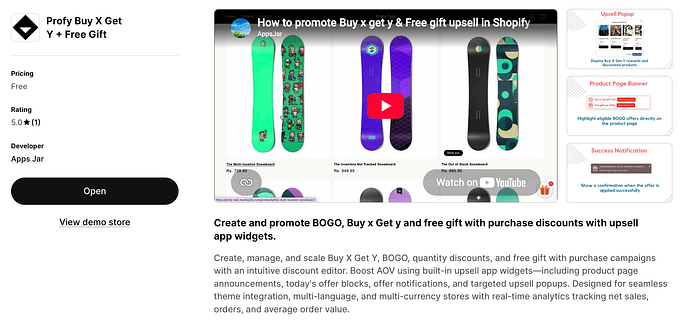
Shopify doesn’t natively provide Buy X Get Y discount promotion widgets. We will install Profy Buy X Get Y + Free Gift Shopify app to create and promote these offers with product page announcements, upsell popups, Today’s Offer widgets, and success notifications.
Then, use the app’s analytics to measure offer performance, identify what works best, and optimize your promotions for higher conversions and sales.
Link: https://apps.shopify.com/profy-bogo-free-gift-upsell
How to Create Buy X get Y Discounts Natively in Shopify (without App)
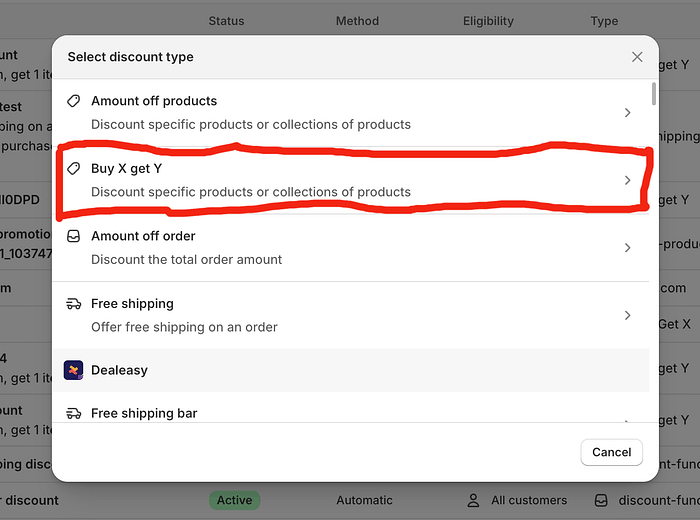
To create a native Buy X Get Y promotion directly inside your Shopify dashboard, follow these steps:
- Log in to your Shopify admin panel and select Discounts from the left-hand navigation menu.
- Click the Create discount button in the upper-right corner.
- In the modal popup that appears, select Buy X Get Y as your discount type to open the detailed setup page.
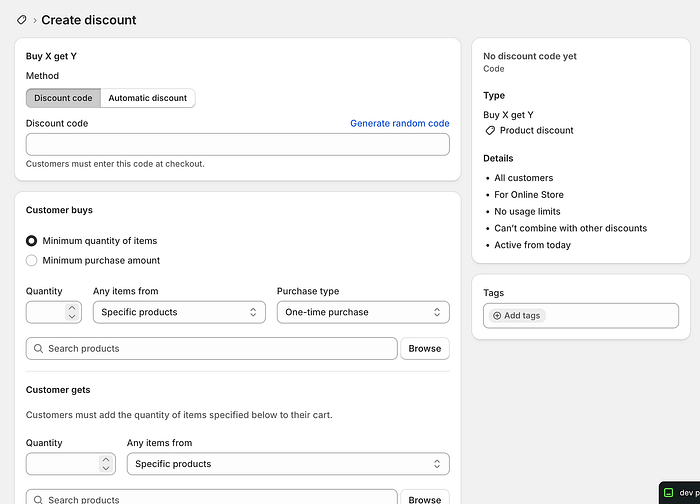
Choose between a Discount Code (entered manually by the customer) or an Automatic Discount. Assign a unique title to identify the promotion.
- Customer Buys: Set the trigger condition by specifying the required item quantity or minimum spend. Choose whether the rule applies to specific Products or entire Collections, set the purchase type (one-time, subscription, or both), and select the items using the Browse picker.
- Customer Gets: Define the reward quantity and select the target products/collections. Set the reward value to Free, Percentage Off, or a fixed Amount Off Per Item, and specify the maximum reward uses permitted per order.
- Eligibility: Restrict access to All Customers (default), specific Market Segments, Customer Segments, or individual Specific Customers.
- Maximum Discount Uses: Set global limit rules, such as limiting the total number of times the discount can be redeemed overall or restricting it to One Use Per Customer.
- Combinations: Choose whether this deal can be combined with other product discounts, order discounts, or shipping offers.
- Active Dates: Schedule the exact start date/time and set an optional end date to automatically start and stop the promotion.
How to Create a Buy X get Y Automatic Discount through App
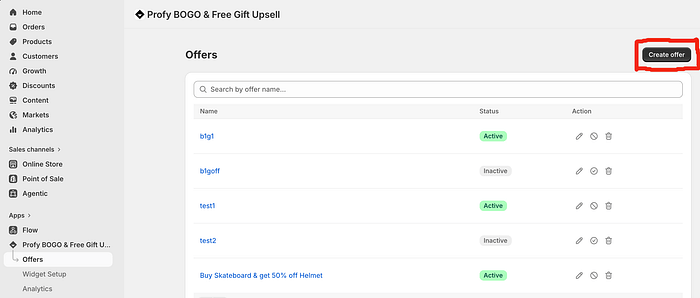
Creating an automatic Buy X Get Y discount using the Profy app simplifies the entire process compared to Shopify’s native setup, merging discount creation and promotional widget configuration into one streamlined workflow.
To get started:
- Open the app and navigate to the Offers section in the left-hand menu.
- Click the Create Offer button to launch the discount setup page.
Unlike Shopify’s native setup, the app automatically configures your offer as an automatic Buy X get Y discount— saving you from having to manually choose between a discount code and an automatic discount when setting up your “Buy X Get Y” or “Free Gift” promotions.
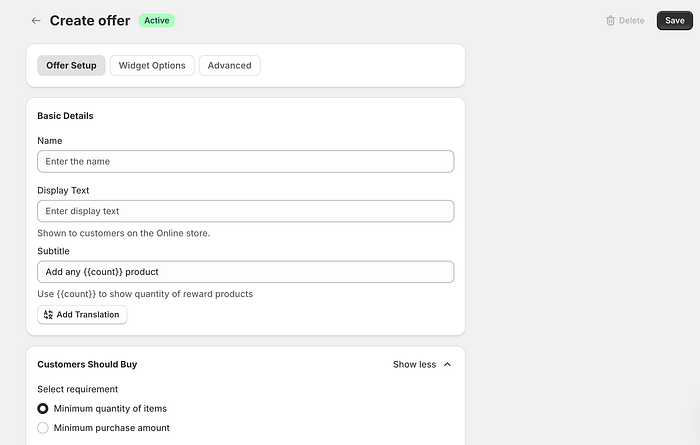
Basic Details Configuration
- Offer Name: Enter a unique name for internal reference. This helps you easily identify and manage the campaign within your app dashboard.
- Display Text: Specify the customer-facing offer title. This text appears directly on your promotional widgets to grab buyers’ attention.
- Subtitle: Add a short descriptive text displayed under the main title to provide extra context or offer details to customers.
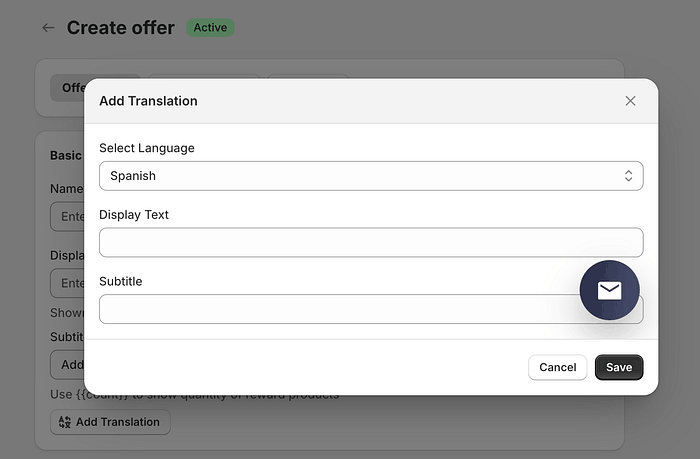
Add Translations: Click this option to open a translation modal, allowing you to enter localized versions of the Display Text and Subtitle for all published languages on your Shopify store.
Configuring the Customers Should Buy and Reward sections is just like Shopify’s native setup: simply set your buy requirements (minimum items or spend) and define the reward details (eligible items, quantities, and discount amount).
Widget Options Configuration
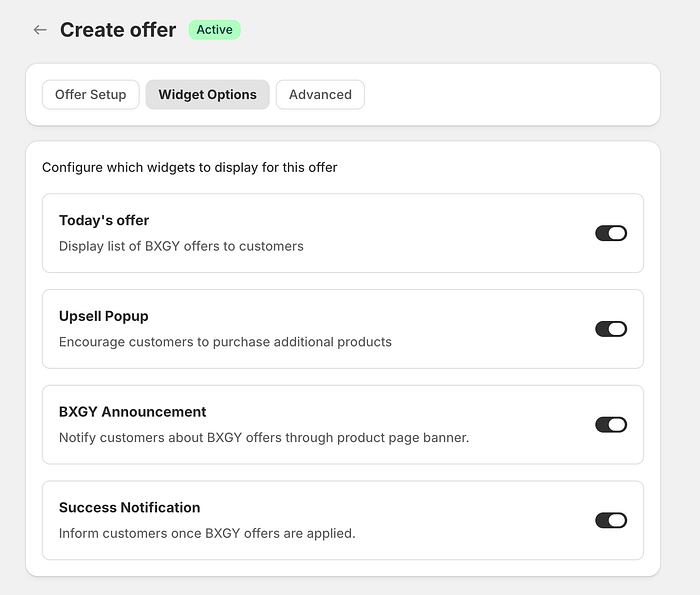
The main advantage of using the Profy Buy X Get Y + Free gift app over Shopify’s native setup is that promotional widget controls are directly integrated into the offer setup screen — whereas native Shopify only allows you to create the discount logic, leaving promotion entirely up to you.
The Widget Options tab allows you to enable up to four integrated widgets to promote your “Buy X Get Y” and “Free Gift” deals: Today’s Offer Widget, Upsell Popup, Product Page BXGY Announcement, and Success Notification. You can toggle any combination of these widgets to dynamically display and highlight your offer across your store.
Advanced Configuration
The Advanced Configuration section lets you schedule your offer to run continuously or set specific start and end dates. You can also restrict usage limits per order and configure discount combinations — allowing your offer to stack with shipping, product, or order discounts, just like in Shopify’s native setup.
How to promote Buy X Get Y free deals using app widgets
The video demonstration below shows all four promotional widgets in action, highlighting how they guide shoppers through every step of the buying journey to maximize your offer’s visibility and conversion rate:
- Today’s Offer Widget: A persistent sticky button fixed to the side of the screen. When clicked, it opens a popup showcasing a full list of all active Buy X Get Y and Free Gift deals across your store.
- Upsell Popup: Triggers automatically as soon as a customer meets the “Buy” requirements. It displays eligible reward products alongside their discounted prices, prompting shoppers to add the extra items to their cart to claim the deal.
- Product Page BXGY Announcement: Displays applicable Buy X Get Y deals directly on the product detail page before a item is added to the cart. This incentivizes hesitant browsers by highlighting the value of the promotion early in their decision-making process.
- Success Notification: Appears immediately after an offer is successfully added to the cart, providing clear confirmation to customers that their discount has been applied to the order.
Tracking Performance and Optimizing Your Buy X Get Y Campaigns
You can monitor and analyze the impact of your promotions directly from the Analytics section of the app.
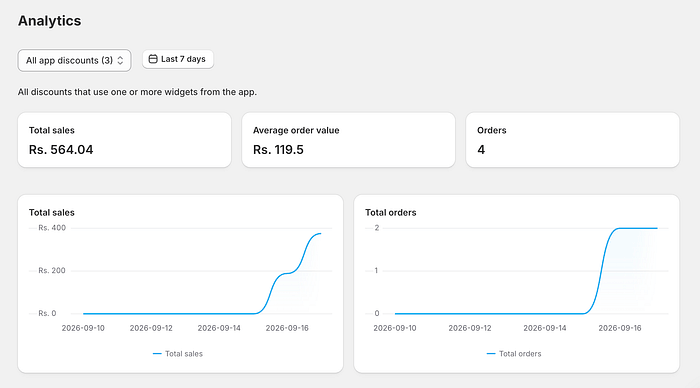
To review performance:
- Select a specific offer or choose All Discounts from the top dropdown menu.
- Set your desired Date Range filter.
Once selected, the dashboard displays core metrics including Total Sales, Average Order Value, and Total Orders, alongside a visual sales and order performance graph plotted over time. Below the chart, a detailed order log lists every transaction attributed to the chosen offer, complete with direct links to view each order inside your Shopify Admin.
By tracking these analytics, you can easily evaluate campaign health, compare performance across different promotional strategies, and continuously test and optimize your offer rules to maximize store revenue.
Conclusion
Creating a Buy X Get Y free offer in Shopify is straightforward, but running a successful campaign requires more than just enabling a discount rule. One of the biggest challenges for any Shopify store is effectively informing customers about the offer at the right stage of their shopping journey.
Because native Shopify settings lack built-in tools to promote offers directly on-site, choosing the right Shopify app is essential. By deploying integrated upsell widgets, you can engage shoppers from the very beginning of their purchase journey — maximizing offer visibility and capturing more potential buyers before they reach the checkout.
Finally, relying on clear analytics allows you to measure each campaign’s real-world impact. By tracking performance metrics and comparing offer variations, you can continuously refine your strategy, optimizing what works and replacing what doesn’t to drive consistent revenue growth.